
Production
In part 1 of the development blog, I went through all the different challenges we had faced in the pre production of the game, discussing the various GDDs and ideas that were being thrown around, and the response to the initial prototypes of the games.
In part 2, I showed all the different art assets I had contributed to the game to make up for the bottleneck of having only one artist in the group.
In this blog, I will go through all the different contributions I made to make sure the entire team worked efficiently to deliver a valuable product on time.
Scrum Master
A couple of designers collectively took on the responsibility of scrum-master, but over time, the responsibility had shifted more towards me and Danial since we were the most consistent at being present.
User stories
After a meeting with the project supervisor, we had a user story template that could work well…

We were using MS Planner since it would integrate well with teams, and that was what Falmouth recommended.
These are the different elements:
- Title – The title of the user story had to be in the format “As a User, I want to ___, So I can ___”
- Assign – The different team members would be assigned, atleast one from each discipline (1 artist, 1 programmer, 1 designer)
- Description – We would require the assigned artist and programmer to collectively agree upon an estimated time, and once the user story was done, note down the actual time. The idea was that if this was an actual project stretched out across months, the actual time would help us as designers to come up with a burn chart, and estimate time for other user stories as well.
- Checklist – We needed artists and programmers to make a list of all the different assets or scripts they would be working on. eg. 3D model of a lighthouse, character controller, etc.
Daily Stand-Ups
We also agreed to have daily stand-ups, where all the group members had to log 3 things:
- What I have done
- What I plan to do
- Any Blockers/issues
The daily stand-ups were set up as a separate channel on teams, where all team members were requested to make an entry everyday.
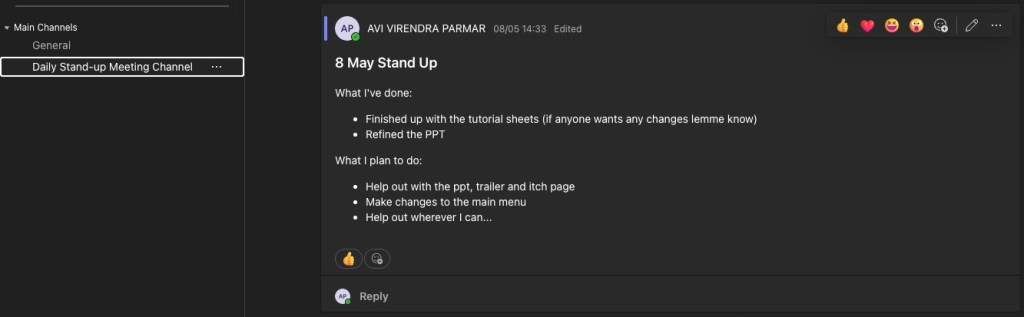
It was pretty difficult to make everyone follow a stand-up since being consistent was difficult, and none of us wanted to feel like we were always monitoring the other person’s work.
What helped was that in any scenario, I made sure at the very least I was consistent. This led to everyone posting stand-ups, and eventually a shared mutual understanding was built and daily stand ups became the norm.
Meetings
Initially, we thought about having daily meetings in place of stand-ups, but we quickly realised that just wasn’t possible, and might even be inefficient with the schedules that other people have, since everyone works at different times in the day.
We generally kept meetings to a minimum, with about 1-2 group meetings per week, to discuss if everyone was on the same page, the progress of things, to plan sprints, and to make sure everyone knew if anyone else has any blockers.
Version Control
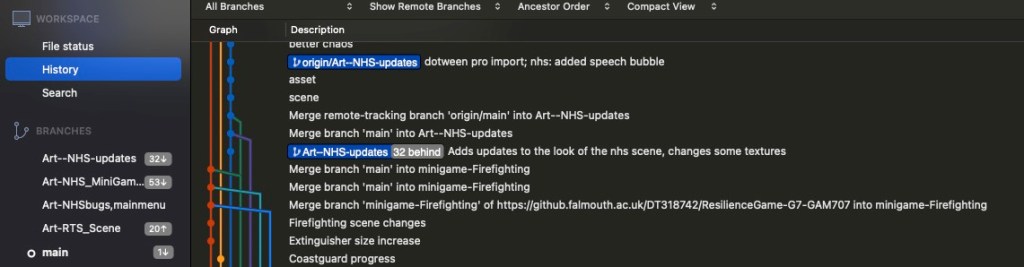
We had also set up version control for our game, so all of us could keep track of all the different things going on.
This was set up by one of our programmers on the Falmouth University servers.
I had to learn Git properly from scratch to be able to keep up with everyone, and would often go to the programmers just to make sure I wasn’t getting in the way, or ruining any branch or anything.
Thankfully, all went well, and I learnt a lot of version control. I was able to create my own branches, and contribute to the art of the game, and for any future presentations to the project supervisor, or for play testing purposes, I could pull and compile the latest version of the game immediately, without having to ask the programmers for a build.
An Iterative process
We ended up play testing this game with multiple people, many of whom were very experienced in the field of making games for children, and we got an incredible amount of feedback.


In addition to taking notes, we would often record the screen as well, in case we were missing out on something.
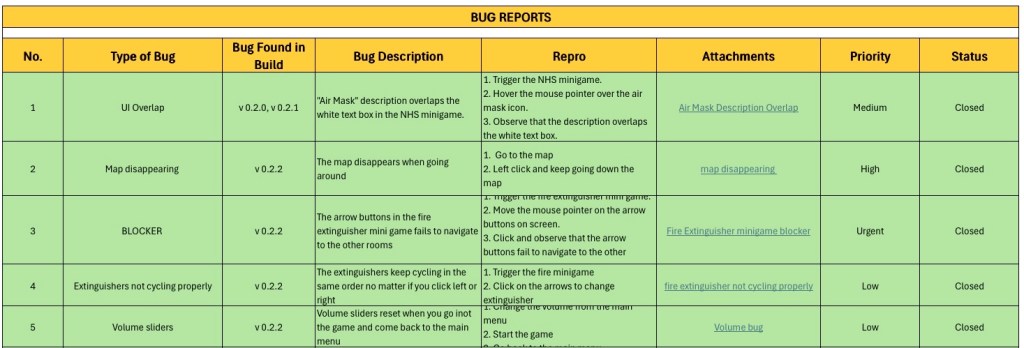
Towards the end of the project, we set up a QA team with two designers, who worked with the programmers in ensuring that all these different feedbacks were implemented. Something that really helped was the excel sheet they used to keep track of everything.
One of the big responses we had from our players is that since it is a kid’s game, the game needs tutorial sheets with some sort of mascot to explain how the game works.
 Avi
Avi 
Leave a comment